






iPaaS, short for Integration Platform as a Service, is a cloud platform that connects the software applications and data sources a business already uses. Instead of building and hosting custom links between every system, a team signs in to one service, picks the apps it wants to connect, maps the fields, and sets the data to move on a schedule or the moment something happens.
The result is a single place to build, run, and watch integrations. Records stay consistent across tools, manual re-entry drops, and the people who manage the flows can see what ran, what failed, and why. Because the platform lives in the cloud, the provider handles the hosting, scaling, and updates, so the team can focus on the logic of the work rather than the infrastructure behind it.
Key takeaways
|
How does iPaaS work?
You start in a web console and create a flow between a source and a destination. You choose which records to move, decide how the fields line up, and set when the flow should run. It can run on a schedule, start from an event such as a new order, or run on demand when someone needs it.
The platform supplies connectors for common systems, a mapping view to align fields between them, and a full run history so you can review results and re-run any records that did not go through. Behind the scenes the provider hosts the engine, scales it during busy periods, and keeps it current. Many platforms include a low code builder, so business analysts can create simple flows while IT sets the standards, reviews, and approvals.
The main parts of an iPaaS platform
Most platforms are built from a few layers that work together:
- A connectivity layer that links systems through connectors, APIs, and file transfers.
- A data layer that maps and transforms records so the destination receives something it understands.
- A process layer that coordinates multi step workflows across applications.
- A security and governance layer that handles sign in, permissions, encryption, and audit trails.
- A monitoring layer that shows run history, errors, and performance so issues are easy to trace and fix.
Key features of an iPaaS
Platforms differ in depth, but most share the same core building blocks. These are the features worth checking when you compare options.
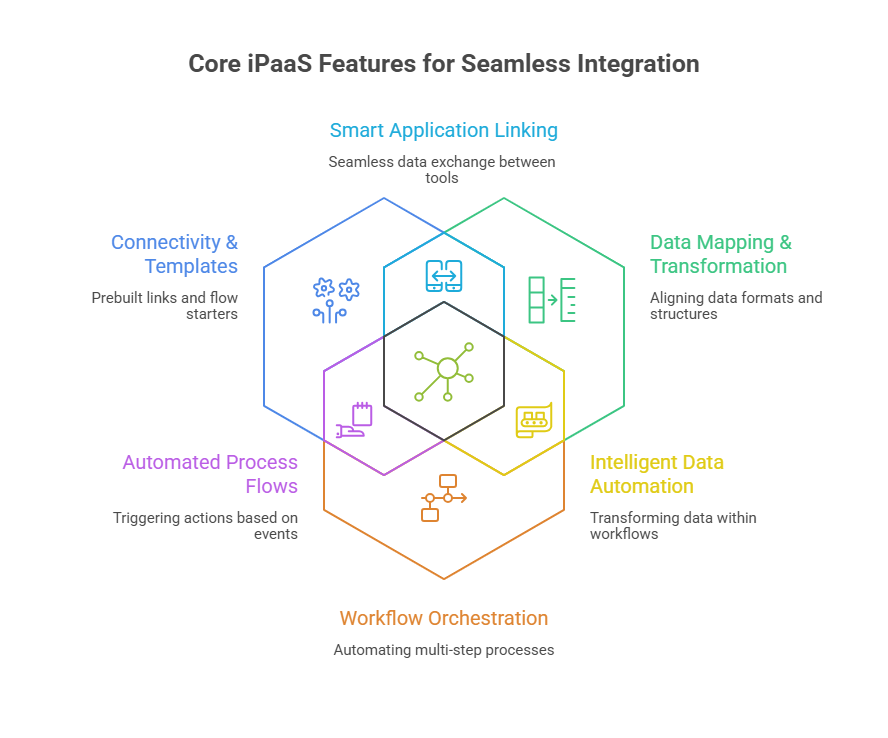
Prebuilt connectors and templates
Connectors are the foundation. They know how to sign in to a system, find the right endpoints, and handle the small differences between tools, so you can link applications, databases, and files without working out every detail yourself. Templates take this further by packaging common flows you can adjust instead of building from scratch.
Data mapping and transformation
Data rarely matches across tools. One system calls a field customer, another calls it account, and a third splits it into parts. Mapping lets you line up fields, change formats, and combine values so the destination receives a record it can use. Good platforms let you test these changes safely before they go live.
Workflow orchestration
Many tasks involve several steps across several systems. You might check a rule, add information to a record, then send a message once an update lands. A visual designer lets you lay out those steps in order and choose how each flow starts, by schedule, by event, or on demand.
Real time and batch processing
Some work needs to happen the instant it occurs, such as updating stock when an order comes in. Other work is better handled in scheduled batches, such as a nightly transfer of large files. A capable platform supports both, and many teams use a mix so urgent updates move at once while heavy loads run during quiet hours.
Monitoring and analytics
A single console shows each run, error, and timestamp. When something fails you can open the record, trace the cause, fix it, and run that case again. Clear logs and alerts turn troubleshooting from guesswork into a routine task.
Security and governance
Integration moves valuable information, so access has to be controlled and visible. Mature platforms support sign in through your identity provider, scoped access, secret storage, and an audit trail. Governance features help IT approve connectors, agree on patterns, and track changes as the number of flows grows.
API lifecycle management
Some flows become services that other teams call when they need them. Basic API features inside the platform, such as keys, rate limits, and usage reports, let you publish a flow as an endpoint. Larger programs may add a dedicated API gateway for deeper policy control.
AI assisted building
Newer platforms add small helpers in useful places. They can suggest how fields should map, flag unusual patterns in the data, and point to a likely fix when a run fails. These hints do not replace careful design or review, but they remove busywork and shorten the time between an alert and a fix.
iPaaS compared to other integration approaches
Most teams run a mix of tools, so it helps to see where iPaaS fits next to the options it is often confused with. Read these as different jobs that are frequently used together, not as either or choices.
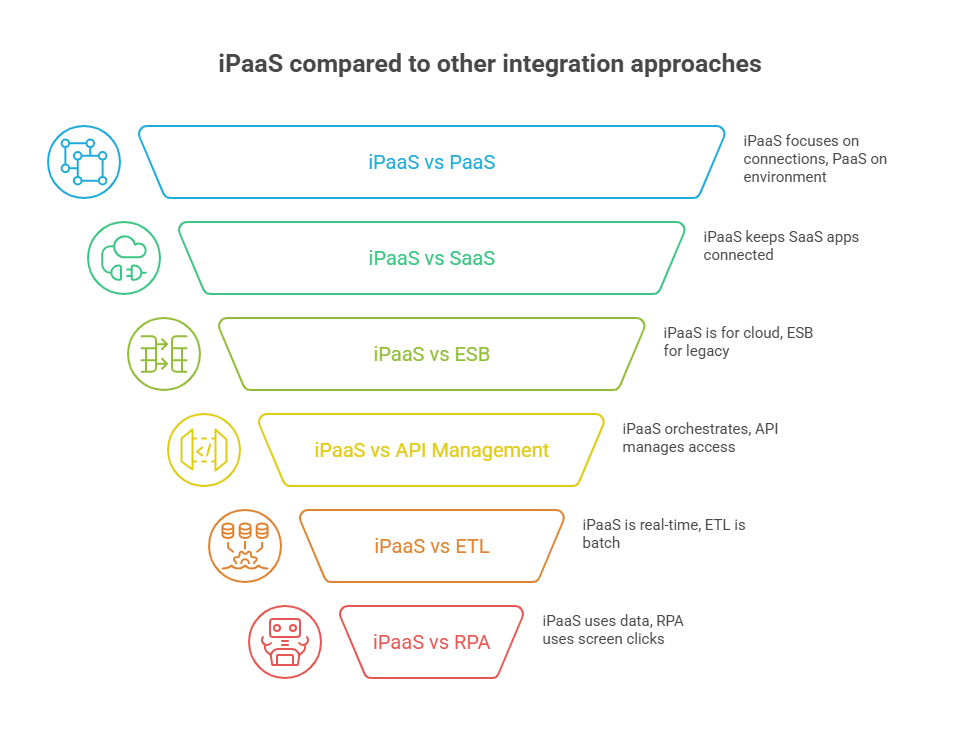
iPaaS vs PaaS
Platform as a Service gives developers an environment to build and run applications, but the connections between systems are left to you. iPaaS focuses on those connections. It arrives with connectors, mapping, scheduling, and monitoring built in, so moving and syncing data is the job it is designed for.
iPaaS vs SaaS
Software as a Service gives you finished applications such as a CRM or a help desk. iPaaS is delivered the same cloud way, but it does a different job: it keeps those applications connected and their data in sync. If your SaaS tools are where people work, iPaaS is the road that carries data between them.
iPaaS vs ESB
An Enterprise Service Bus was built for systems inside a data center and still suits some internal, long lived setups. iPaaS is built for cloud applications and outside partners, and it usually needs less setup to link them. Teams often keep an ESB for legacy traffic while using iPaaS for newer cloud work.
iPaaS vs API management
API management is about publishing, securing, and watching APIs. iPaaS is about moving data between systems and running multi step workflows. They sit side by side in many setups: iPaaS handles the orchestration behind the scenes while an API gateway controls access at the edge.
iPaaS vs ETL
ETL tools extract, transform, and load data, usually in batches and most often into a data warehouse for reporting. iPaaS covers application to application integration and process automation, often in real time. Many businesses use both, with ETL feeding analytics and iPaaS keeping operational systems in step.
iPaaS vs RPA
Robotic Process Automation works at the screen level, copying the clicks a person would make when no API is available. iPaaS connects systems through their data and interfaces instead. The two often work together, with RPA reaching into older software and iPaaS moving the data once it is out.
iPaaS vs traditional middleware
Classic middleware solved hard problems and still matters in some places, but it asks for heavy setup, specialist skills, and ongoing care. iPaaS keeps the logic you need and removes much of the hosting and upkeep. It ships with connectors, a builder, and an operations console, which shortens the time between a request and a working connection. You can also start with one small, high value flow and grow from there.
Benefits of iPaaS
The gains below are the ones teams tend to notice first.
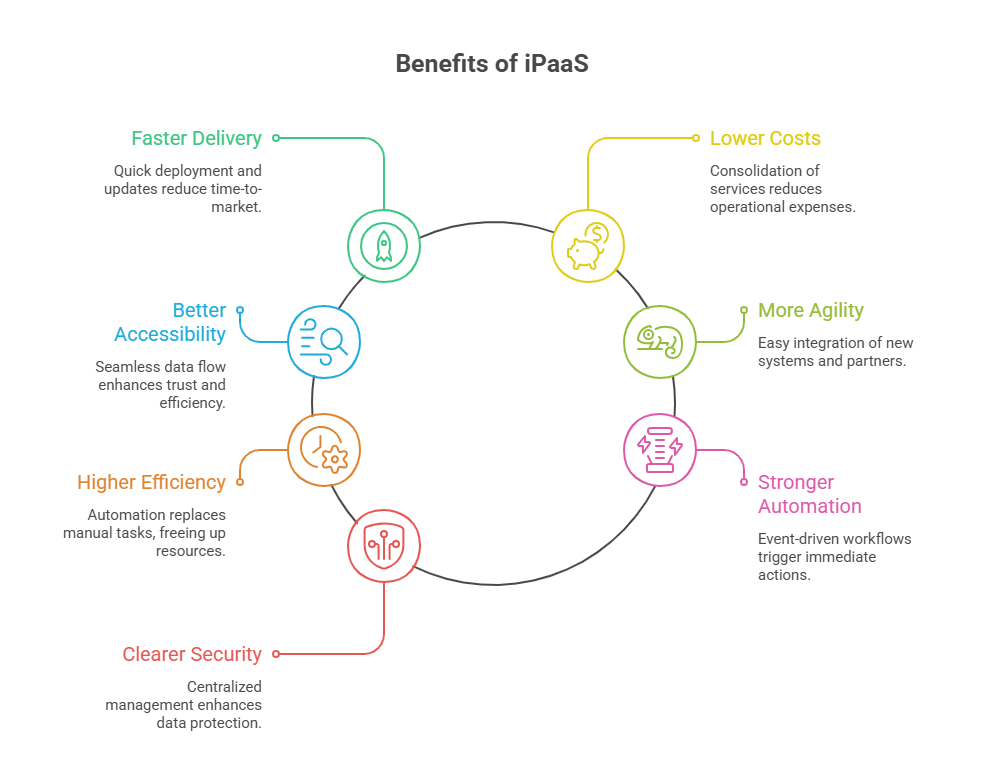
Faster delivery
Ready connectors and a visual builder mean a pilot can go live in days rather than months. Changes happen inside the same environment, so edits are quicker to review and safer to release. As needs change, you update the flow instead of rebuilding the foundation.
Lower running costs
Bringing integrations into one service replaces scattered scripts and servers. Operations watch one console, and capacity scales with use. Developers spend their time on business rules rather than setup and patching.
Better data accessibility
When systems stay in sync, people trust the records in front of them. Customer, order, and inventory data appears in the applications where teams already work, which removes duplicate entry and side spreadsheets and helps reports line up.
More agility
New apps arrive, partners change formats, and product lines expand. With a platform, you connect the new system, map the fields, and reuse a pattern you already trust, so smaller and safer releases become the norm.
Higher efficiency
Automated handoffs replace slow, error prone steps such as file uploads or copy and paste. Standard flows run the same way every day, which makes exceptions easy to spot and fix, and frees people to spend more time with customers.
Stronger automation
Event led flows act the moment something happens, such as a new order or a stock change. Rules can add information, trigger approvals, and send updates without waiting for a batch window, and common steps become shared components used across teams.
Clearer security posture
One platform reduces scattered secrets and unknown jobs. Access follows roles, tokens expire on a schedule, and changes leave a clear trail, with sensitive fields masked by policy and requests logged in one place for review.
Common iPaaS use cases
Most programs start with one flow that matters and then expand. These are the patterns teams reach for most often.
Application integration
Connect core applications so work moves without re-entry. A new customer created in a CRM appears in the ERP, and a support update flows back to the account, so everyone sees the same facts. This is the most common starting point because it solves a visible, everyday problem.
Data integration and synchronization
Move records for analytics or operationson a schedule or close to real time. Mappings align fields and formats so data lands cleanly, sources agree, and dashboards make sense. This reduces the risk of several versions of the truth.
Business process automation
Link steps that span systems, such as order to cash or employee onboarding. The flow starts on a trigger, runs its checks, updates records in the right order, and notifies people when action is needed, which makes the process visible and repeatable.
B2B and partner integration
Exchange data with partners using managed connections and shared rules, including EDI formats where they apply. A standard approach replaces one off projects, so when a partner changes a format you adjust the mapping rather than rebuild the link.
Cloud integration
Bridge services across public clouds and private environments without writing a new gateway for every pair. One control plane reduces handoffs, so the team designs a flow once and runs it where the data lives.
Event driven and IoT integration
Trigger flows from business events instead of polling, and collect device or sensor data, filter the noise, and route the rest to systems that can act on it. As volumes rise, the managed runtime scales with them.
API integration
Publish selected flows as APIs so other teams can call them safely, with keys, limits, and usage tracking. Some organizations pair this with a dedicated gateway for deeper policy while keeping the orchestration in the platform.
Challenges of iPaaS and how to manage them
A platform does not remove every hard part, but it makes the hard parts easier to manage. Plan for these early.
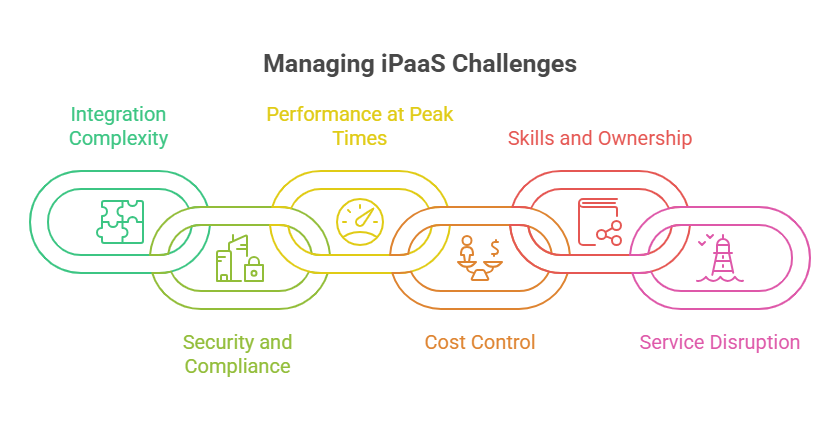
Integration complexity
Large portfolios need clear data contracts and shared rules, or flows overlap and produce conflicting updates. Write the rules down, store mappings in version control, and promote proven designs as templates. Pilot with real data before a broad rollout.
Security and compliance
Central flows move valuable data, so broad access or stale tokens raise risk quietly. Start with narrow access, rotate secrets on a schedule, keep approvals and run logs in one place, and review them on a regular cadence with named owners.
Performance at peak times
Launches and busy seasons test your flows, and large payloads or slow endpoints can create backlogs. Shape data at the source, size pages and retries sensibly, and add dashboards for queue depth and run times. Run a short load test before peak events and keep a rollback ready.
Cost control
Subscription pricing is predictable, but waste still creeps in through unused connectors and duplicate flows. Tag flows with owners and purposes, trim duplicates, and review usage on a monthly basis so teams can see the trade offs.
Skills and ownership
Low code lowers the barrier, but good integrations still need owners who understand the data and the process. Offer short training, pair new builders with reviewers, and keep brief notes with each configuration so knowledge spreads.
Service disruption
Any managed service can have incidents or maintenance, and a short outage creates gaps if flows lack retries. Add retries, backoff, and a safe place to hold work, subscribe to provider notices, and keep a simple runbook with contacts and steps.
How to choose an iPaaS
The choice goes well when it starts with real work rather than a feature wish list. Use the points below to guide a short, practical evaluation.
Match it to your systems
List the systems you must connect and the records that matter, then check that the platform already ships connectors for those targets and can reach any on site apps securely. Run a small pilot with real data and watch how mappings, errors, and retries behave. A tool that handles your hardest flow cleanly will handle the rest.
Check ease of use
Your team should understand the builder within an hour. Look for a clear canvas, simple field mapping, readable errors, and an easy way to test changes. Day two tasks matter too, so confirm you can roll back, compare versions, and hand over ownership without friction.
Weigh support and community
Read the documentation, watch a short tutorial, and open a test ticket to judge response quality. Active forums and regularly updated templates shorten both delivery and recovery, so they are worth checking before you commit.
Confirm security and compliance fit
Access should be simple to grant and easy to review, with sign in through your existing identity system, role based permissions, and clear audit trails. Confirm where data moves and where it is stored during a run, and that approvals for sensitive flows live inside the tool.
Make the pricing predictable
Learn how pricing scales, whether by runs, data volume, connectors, or environments, and ask the provider to price both typical and peak usage so there are no surprises. Watch for extra costs such as premium connectors, and favor a model that lets you start small and expand.
iPaaS and AI agents
Integration is becoming the layer that connects AI assistants to the systems a business runs on. When an AI agent needs to read an order, update a record, or kick off a process, it has to reach those systems safely, and that is the same job an iPaaS already does.
Two shifts are worth knowing. First, platforms are adding ways for AI tools to call integration flows directly, including support for the Model Context Protocol, an open standard that lets assistants connect to data and actions in a consistent way. Second, builders are gaining natural language help, so a person can describe a flow in plain words and get a first draft to review. The data mapping, approvals, and run history still apply, which keeps these agent driven actions inside the same controls the rest of your integrations use.
For most teams the practical takeaway is simple. The same platform that syncs a CRM with an ERP today can become the safe path that AI agents use tomorrow, without standing up a separate set of connections for them.
The future of iPaaS: AI, Automation, and Beyond
The direction is steady and practical. Building flows will keep getting easier, operations will get smarter with AI assisted mapping and error detection, and governance will become more visible. Event led designs will grow more common as more systems emit reliable signals, and hybrid setups will stay normal, with one control plane that reaches cloud and on site systems through the same controls.
Conclusion
iPaaS turns integration into a steady practice a team can run and improve. It links the tools people already use, keeps records aligned, and gives you one place to watch and repair flows. A sensible way to begin is to pick one high value connection, write down the pattern that worked, and grow from there. Small, consistent steps build a reliable backbone for the rest of the stack.
Frequently Asked Questions
iPaaS is a cloud service that connects your software applications and keeps their data in sync from one place. You build a flow between a source and a destination, map the fields, and set it to run on a schedule or when an event happens.
A platform provides the controls, and your policy decides how they are used. Look for sign in through your identity provider, role based access, secret storage, encryption in transit, and a clear audit trail, then review access on a regular schedule.
Not for everything. Low code builders and templates let analysts create simple flows, while IT sets the standards, reviews, and approvals and handles the more complex work.
A small, well scoped flow with ready connectors can go live in days. Larger programs with many systems, custom mappings, and approvals take longer, so most teams start with one high value flow and expand.
If most of your systems are on site and the processes are long lived and internal, an ESB may still fit. iPaaS becomes the stronger choice as you add cloud apps, partners, and hybrid traffic.










