Atul Gupta is the Co-Founder & CEO of APPSeCONNECT, with nearly two decades building enterprise integration and automation technology. A recognized voice in the iPaaS, B2B eCommerce, and business process automation space, he has scaled solutions trusted by 1,500+ businesses across 75+ countries. Former Chairman of NASSCOM's Eastern Region SME Council, Atul writes on connected business, ERP integration, and digital transformation.











How to Add Customer Web Order Comment in SAP ERP from Magento
INSIDE THIS ARTICLE
Search
Request Demo or Trial
.
When an order is placed on the web, you may have customers who put in some comment at the time of placing the orders. This extra information from your customers may add an additional value and asset to have in the ERP system. It might help you to better provide your product and take advantage of customer satisfaction. Following are some examples of what these comments may contain:
Most e-commerce websites provide a way for a customer to add his/her comments to the order during checkout. Magento, however, does not provide a built-in feature for this.
There are many free extensions available for Magento 2.0. For this demonstration, we are using our own developed extension to make it compatible for SAP integration – APPSeCONNECT. Once, we complete installing this mentioned extension, below are the steps to configure it.
1. Go to Configuration -> SALES -> Checkout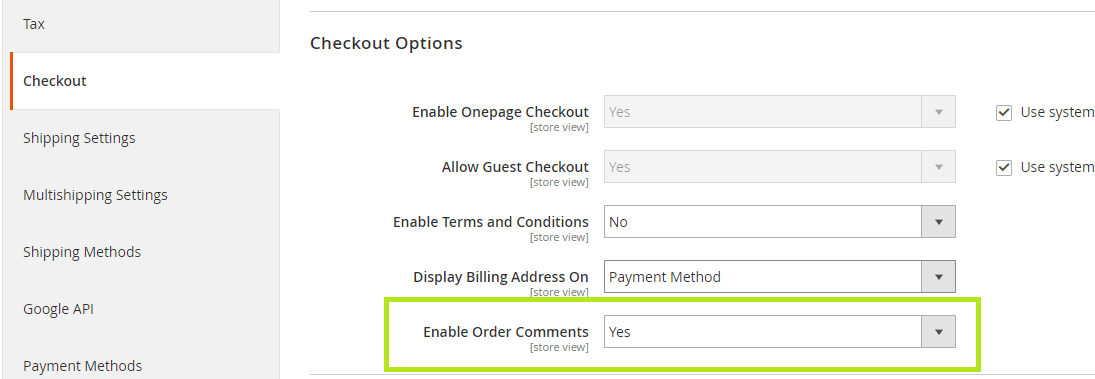
Once we enable order comments from back-end, it will appear on checkout page below the apply discount section.
2. Add Comment on Checkout page
Once we will place the order, this comment will appear on magneto frontend as well.
Integrate the Order Comment:
SAP has texts stored in the form of long texts. They are stored within Order Header -> Text as shown in the picture below. As you can see there are multiple texts associated with an order. Each text has a specific purpose and a unique text id. APPSeCONNECT integrates order comments by mapping the customer text to a specific text ID within an order. After syncing the order comment, we can check the comment in ORDER_HEADER -> TEXT section of SAP order.
Video Demonstration
This demonstration video shows how APPSeCONNECT integrates this aspect. Following steps are in the video:
a. Creation of Order in Magento 2.0
b. Placing Order comment at the time of placing the order.
c. Syncing order manually using the APPSeCONNECT agent. Showing the resulting order in SAP with the comments downloaded
Now, you can easily integrate SAP ECC with your Magento store and automate the Business Process!

You may also like:
How to Synchronize Increment Quantity between SAP ECC and Magento 2
Minimum Order Quantity of Products in SAP ECC to Magento 2.0
Understanding Unit of Measures within SAP ERP and Magento
Why is iPaaS crucial for SAP ECC Implementation
ERP Integration Statistics and Trends You Need to Know in 2026
ERP integration is no longer only an IT concern. It determines whether sales, finance, commerce, fulfillment, and procurement teams act on the same business record.
CRM ERP Integration Statistics and Trends You Need to Know in 2026
CRM ERP integration connects the customer-facing work managed in a CRM with the operational and financial work managed in an ERP. When the connection is
What Is ERP Integration? A Complete Guide to Methods, Benefits and How It Works
ERP integration is the process of connecting your ERP system to the other applications your business runs on, so data moves between them automatically instead