Connecting NetSuite to a B2B storefront is what turns a product catalog into a working sales channel. When the two systems share data cleanly, buyers see their own pricing, place orders against their account, and check stock and invoices on their own time, while your finance and operations teams work from one set of records. This guide explains what NetSuite B2B integration involves, the data that has to move between systems, the platform choices in front of you, and a practical way to put it in place with an integration platform such as APPSeCONNECT.
What is NetSuite B2B Integration?
NetSuite B2B integration is the process of connecting NetSuite ERP with a B2B commerce platform, such as SuiteCommerce Advanced, Shopify Plus, or BigCommerce, so that orders, inventory, pricing, payments, and customer records stay in sync. In a B2B setting it also has to carry the details that consumer selling never deals with: pricing that is specific to each account, company structures with several buyers, credit limits and payment terms, and purchase order numbers that need to land on the right sales order. Done well, it gives you one source of truth for finance, inventory, and customer data, and it removes the manual rekeying that slows order processing and creates errors.
- One source of truth, so finance, CRM, and inventory data stay aligned across every channel.
- Live synchronization, so stock levels and order status stay current as orders come in.
- Room to grow, so specialized connectors for CRM, payments, and shipping can be added over time.
How is B2B Integration Different from B2C?
B2B and B2C selling can look similar on the surface, but the data behind them is not the same. A consumer order is usually one shopper, one price, one payment. A B2B order is an account with several buyers, pricing that was negotiated, terms such as net 30 or net 60, approvals before an order is placed, and a purchase order that has to match. Many integration tools were built for consumer selling and later stretched to cover B2B, which is where workarounds start to appear. A B2B ready integration reads the correct price for each buyer while they browse, checks credit before accepting an order, and keeps the company, location, and contact relationships intact on every record.
What Data Moves Between NetSuite and Your Storefront?
The core of any NetSuite B2B integration is matching the right records in NetSuite to the right fields in your storefront. These are the flows that generic connectors most often miss, so they are worth confirming before you commit to a platform.
NetSuite record | Storefront field | Why it matters |
Price levels and item pricing | Account specific catalog price | Each buyer sees their negotiated price, not list price |
Credit limit and balance | Checkout payment terms | Buyers over their limit cannot order on terms |
Customer and sub customer hierarchy | Company and location accounts | Subsidiaries and buyers keep their relationships |
Purchase order number at checkout | Sales order purchase order field | Buyer purchase orders reconcile cleanly |
Tax exemption status | Zero tax at checkout | Wholesale and reseller accounts are not over taxed |
Ship to address records | Saved ship to addresses | Multi location buyers ship without duplicate records |
Sales order and order status | Order and fulfillment status | Buyers track progress without calling your team |
Account specific pricing lives in NetSuite as price levels on each customer record, and a capable integration reads that level and writes the correct price into the buyer’s catalog. Ship to addresses map to the address records already on the customer rather than creating duplicates with every order. If you walk a vendor through this table and they hesitate on any row, that is usually where the project will struggle later.
Which Platforms Work Well with NetSuite?
Shopify Plus
Shopify Plus includes native B2B features, including company accounts and catalogs and pricing that can be set for each customer. The integration work here is mainly about writing the correct price into each buyer’s catalog when it changes in NetSuite.
BigCommerce B2B Edition
BigCommerce B2B Edition adds customer groups, price lists, and a separate buyer portal. Keeping the price lists in step with NetSuite is the part that matters most.
Adobe Commerce and Magento
Adobe Commerce has a deep B2B feature set, with shared catalogs, requisition lists, and quick order forms. Each of these maps to price levels and customer hierarchies in NetSuite.
SuiteCommerce Advanced
SuiteCommerce Advanced is built by the same vendor and links to NetSuite without a separate connector, trading some front end flexibility for a single vendor stack. None of the independent platforms ship a native NetSuite connector, so a purpose built integration is part of the project on all of them.
Handling Credit, Terms, and Invoices
Credit at checkout is the point where B2B integrations most often break. When a buyer signs in, the storefront should check their credit limit and current balance in NetSuite, decide whether they can order on terms, and show or hide net terms payment methods to match. Without a live credit check, buyers who are over their limit can place orders that someone then has to reverse by hand. Beyond the order itself, B2B buyers expect to view and pay invoices online and to see credit memos applied to open balances. Surfacing those NetSuite transactions in the portal turns it into a self service finance tool and takes a steady stream of questions off your team.
How to Integrate NetSuite B2B eCommerce in Five Steps
- Choose your storefront, whether that is Shopify Plus, BigCommerce B2B Edition, Adobe Commerce, or SuiteCommerce Advanced.
- Use an integration platform such as APPSeCONNECT for ready made NetSuite connectors and low code mapping.
- Map the fields that matter in B2B: price levels to catalog pricing, the company structure to storefront accounts, the purchase order number to the sales order field, and tax exempt status to checkout.
- Set your sync method, whether live webhooks or scheduled windows, add a credit check at checkout, and define how errors are caught and retried.
- Test end to end in a sandbox, then watch your dashboards and alerts once you go live.
A clear, staged plan keeps a NetSuite B2B integration from turning into an open ended custom build.
What to Look for in an Integration Platform
The platform you choose shapes how much of this you maintain yourself. When you compare options, weigh how quickly it can be set up, whether business users can manage mappings without writing code, how often it syncs, and how it handles errors when something fails. Security and compliance matter too, so check which standards a vendor supports, such as SOC 2, ISO 27001, and PCI DSS, and confirm it fits the way your buyers and auditors expect data to be handled.
How APPSeCONNECT Fits In NetSuite B2B Integration
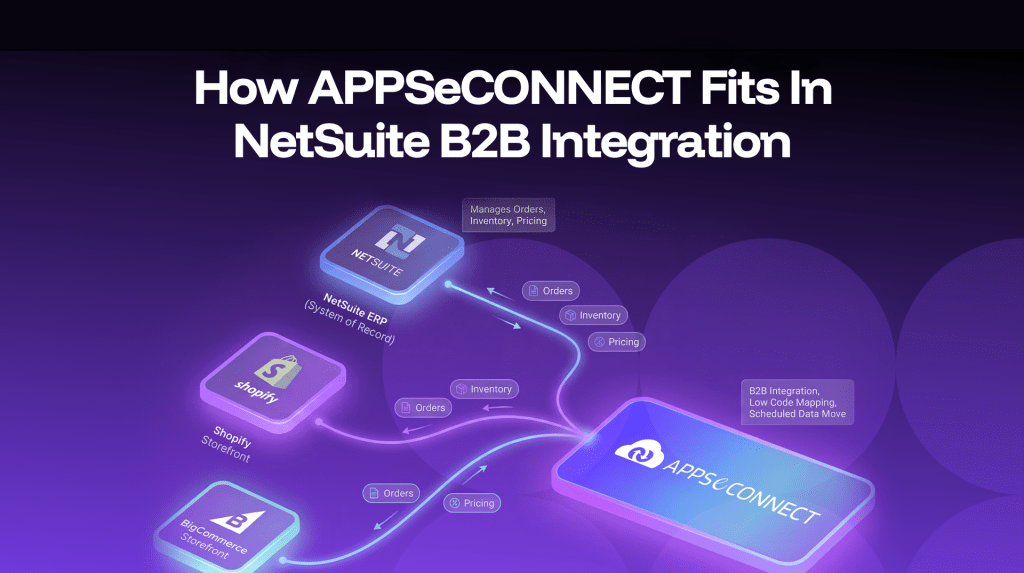
APPSeCONNECT connects NetSuite with platforms such as Shopify and BigCommerce and manages orders, inventory, and pricing through ready made connectors and low code mapping. It is built to move data on a schedule that suits B2B operations and to keep the ERP as the system of record while your storefront stays current. If you want to see how it would map to your own price levels and account structure, you can book a working demo.
Conclusion
NetSuite B2B integration is what lets wholesale and distribution businesses sell online without losing the structure their operations depend on. The work is less about putting products on a website and more about carrying the data that B2B runs on, including account pricing, credit terms, company hierarchies, and purchase orders, alongside live inventory and order status. With a connector such as APPSeCONNECT, you can give buyers a self service portal that stays backed by your ERP, and keep your teams working from one set of records.
Frequently Asked Questions
Use an integration platform that connects your storefront and NetSuite ERP so that orders, inventory, and pricing sync on their own. This avoids custom code and keeps both systems aligned.
B2B carries account level data that consumer selling does not, including account specific pricing, credit limits, company hierarchies, and purchase order numbers, all of which have to map to the right records in NetSuite.
Yes, with a connector set up for it. The purchase order number from checkout maps to a custom field on the NetSuite sales order so orders reconcile cleanly.
Yes. When invoices and credit memos from NetSuite are surfaced in the portal, buyers can view, download, and pay them and see credit applied to open balances.
Not with a low code platform. You can define triggers, rules, and field mappings through the interface, while more complex flows can still be customized when you need them.