Choosing among iPaaS vendors can feel harder than it should. Every platform sounds capable. Every vendor claims to make integrations easier. The real question is not which vendor looks strongest on a list. It is which one fits your systems, your team, your workflows, and your budget. A wrong choice creates messy data, hidden costs, and integrations that become painful to manage later.
An iPaaS becomes part of daily operations the moment it connects your ERP, CRM, eCommerce store, warehouse, and finance tools. That is why fit matters more than feature count, and why a repeatable way to compare vendors beats reacting to whichever demo looked best last.
Key Takeaways
|
What Is An iPaaS, And What Does It Actually Do?
An iPaaS, or integration platform as a service, is a central connection layer between the apps a business uses. It helps different systems share data and trigger actions without every connection being built from scratch.
In practice, an iPaaS can move an online order into an ERP, update inventory in an eCommerce store, send customer details to a CRM, or pass invoice data into accounting software. Most platforms use connectors, data mapping, workflow rules, alerts, and monitoring. The business idea behind those technical pieces is simple: systems work together with less manual copying, checking, and fixing.
The category has grown because businesses now run on many connected systems. iPaaS revenue reached $7.77 billion in 2023 after 30.7% growth, then rose to $8.5 billion in 2024 after another 23.4% growth, making it one of the fastest-growing segments of enterprise middleware. The wider platform-as-a-service market grew 20.2% to $165.4 billion in 2024, a sign of how much business now depends on connected cloud services.
Business Need | What iPaaS Helps With | Buyer Question |
Keep data aligned | Orders, customers, inventory, invoices, and payments | Will the data stay accurate across systems? |
Reduce manual work | Updates, approvals, alerts, and task handoffs | Will teams still need to fix things manually? |
Track what happens | Logs, errors, retries, and user access | Can the team see what failed and why? |
The vendor choice matters because integration shapes how quickly work moves and how much cleanup your team still has to do. Once a platform connects your ERP, CRM, eCommerce store, warehouse, finance tools, and partner systems, the cost of switching later is real.
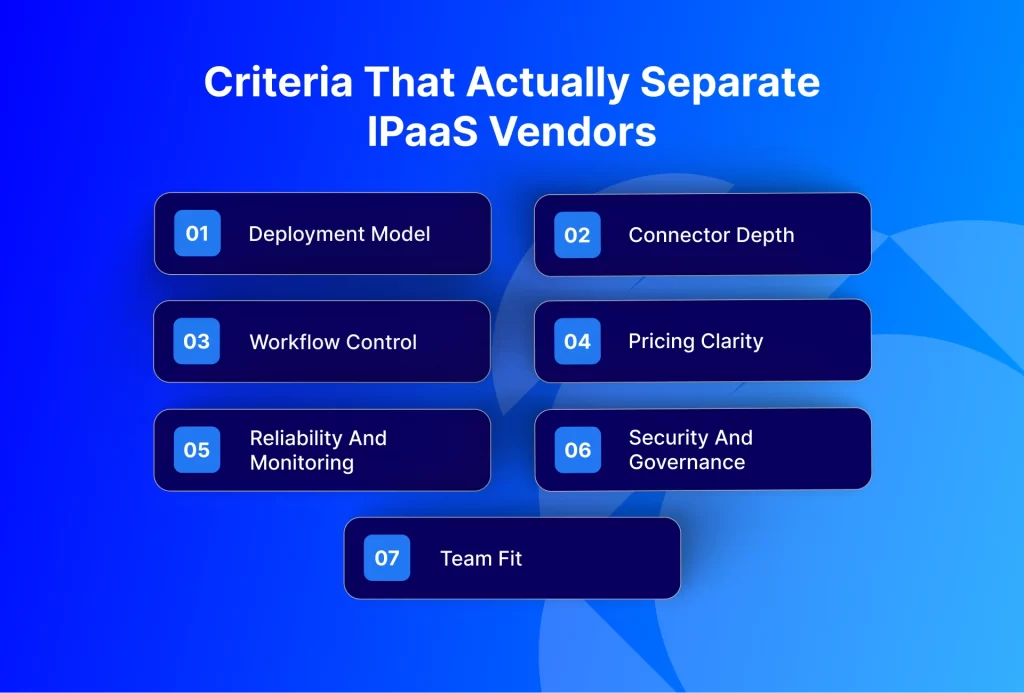
Criteria That Actually Separate iPaaS Vendors
A long feature list can look impressive, but it does not always tell you how a platform behaves in real work. Buyers usually feel the difference in a few practical areas. Use these as what to look for, weighing them against your own systems rather than treating any single one as decisive.
Deployment Model
Start with where your systems live. Some businesses only need cloud-to-cloud integration. Others still run on-premise ERP, warehouse, POS, or legacy systems, and many mid-market and enterprise companies use a mix of both.
If your important systems are split across cloud and on-premise environments, the iPaaS should support that without forcing awkward workarounds. This matters most for manufacturers, distributors, retailers, and ERP-led companies that cannot move everything to the cloud at once.
Connector Depth
A connector list can mislead if you only count logos. A vendor may say it connects to your ERP, CRM, or eCommerce platform, but the better question is what that connector can actually handle. Can it move the records you need? Can it manage custom fields? Can it handle errors? Can it respect the rules inside your ERP?
A basic connection may work for simple data movement and still fail once business rules get more complex.
Workflow Control
Integration is not only about sending data from one app to another. It is about deciding what should happen before, during, and after that data moves.
What happens if an order is missing a customer code? If inventory is not available? If the invoice amount does not match the order? If one system accepts the record and another rejects it? A capable iPaaS helps teams manage these situations with rules, alerts, retries, and clear visibility.
Pricing Clarity
Pricing should be judged against your future workload, not only your first project. Some vendors charge a fixed subscription, some charge by usage, and others charge by connector, workflow, transaction volume, or custom scope. None of these models is automatically bad, but each behaves differently as integration needs grow.
Software pricing is also shifting across the market. IDC expects many software vendors to move pricing toward usage, outcomes, or business value by 2028, forecasting that seat-based pricing will become obsolete and push 70% of vendors to refactor into new models as AI changes how software delivers work. For iPaaS buyers, that means pricing conversations should cover more than the starting plan.
Reliability And Monitoring
Even strong integrations fail. A product code may not match, a field may be missing, a third-party app may be down, or a user may change something that breaks a workflow later. The real question is whether your team can see the problem, understand it, and fix it quickly.
Look for clear logs, alerts, retry options, and record-level tracking. If the team has to chase every issue through emails, screenshots, and support tickets, the platform can create stress even when the integration technically works.
Security And Governance
Integrations often touch sensitive business data: customer records, prices, orders, invoices, payments, tax details, and inventory. The platform should give teams control over who can build, edit, approve, and monitor workflows, and it should maintain a clear history of what changed and who changed it. This matters more as additional teams start depending on the same integration layer.
Team Fit
A highly technical platform can suit a strong developer team and frustrate a business team that needs to manage everyday workflow changes. A no-code or low-code platform may be easier for operations teams while still needing enough control for real business processes.
Before choosing a vendor, ask who will own the platform after launch. IT? Operations? Finance? RevOps? A shared team? The answer should shape the decision.
Weighing The Criteria: A Scorecard You Can Apply
A weighted scorecard gives each shortlisted vendor the same test. Score every vendor from 1 to 5 on each criterion, multiply by the weight, and compare the totals. The score does not replace judgment; it makes the tradeoffs visible.
Adjust the weights to your situation. An enterprise buyer may give more weight to security, governance, and scale. A mid-market ERP-led business may care more about ERP workflow fit, pricing clarity, and support. An SMB may weight setup speed, ease of use, and predictable cost.
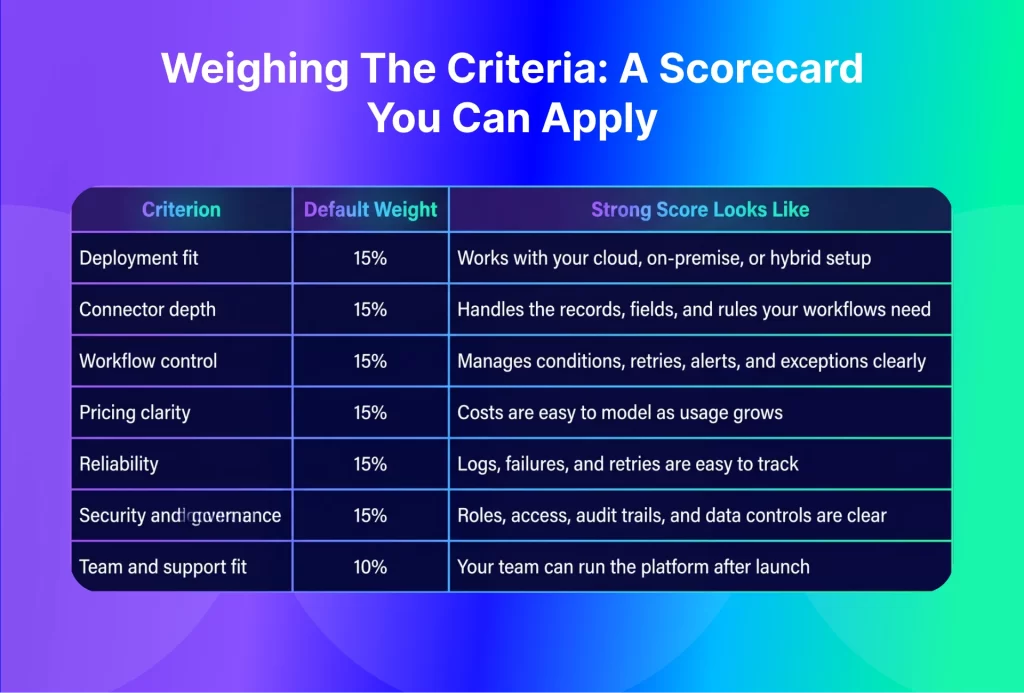
The highest total is not always the winner. Some criteria are non-negotiable. If you need hybrid deployment and a vendor only works well for cloud-to-cloud workflows, a great interface will not save it. If your ERP runs the core business, weak ERP workflow support should outweigh a large connector list.
Pricing Models: Where iPaaS Costs Actually Escalate
iPaaS pricing can look simple at first and get harder to compare once the real scope appears. The base platform fee is only one part of the cost. Extra costs come from more workflows, higher record volume, premium connectors, additional environments, support, implementation help, or professional services.
This is why buyers should price the second and third phase of the roadmap, not only the first integration. A business may start with order sync between Shopify and an ERP, then add inventory updates, pricing sync, invoices, returns, marketplaces, CRM, warehouse updates, and EDI. If the pricing model grows too quickly with each step, the platform becomes expensive to scale.
Pricing Model | How It Works | Cost Risk | Best Fit |
Subscription | Fixed monthly or annual platform cost | Plan limits may restrict usage | Teams that want predictable budgets |
Usage-based | Cost changes with tasks, records, runs, or data volume | Costs can rise as automation grows | Teams that can estimate volume well |
Connector-based | Cost changes with connected apps or endpoints | More systems can raise the bill | Smaller stacks with clear app needs |
Flow-based | Cost changes with workflows or automations | Complex processes may need many flows | Teams with a defined workflow scope |
Custom quote | Pricing depends on scope and business needs | Harder to compare across vendors | Larger or more complex programs |
Pricing varies by plan and usage, so check each vendor’s current figures before you budget. Ask every vendor what happens when order volume doubles, another marketplace is added, a second ERP entity goes live, or support needs increase during peak season. Those answers often reveal more than the starting price.
Matching The Framework To Your Business Type
Different businesses should not score iPaaS vendors the same way. A SaaS company with a simple CRM and billing stack has different needs from a distributor running ERP, warehouse, EDI, eCommerce, and finance workflows. A small business may want speed and simplicity; an enterprise may need stronger control, auditability, and scale.
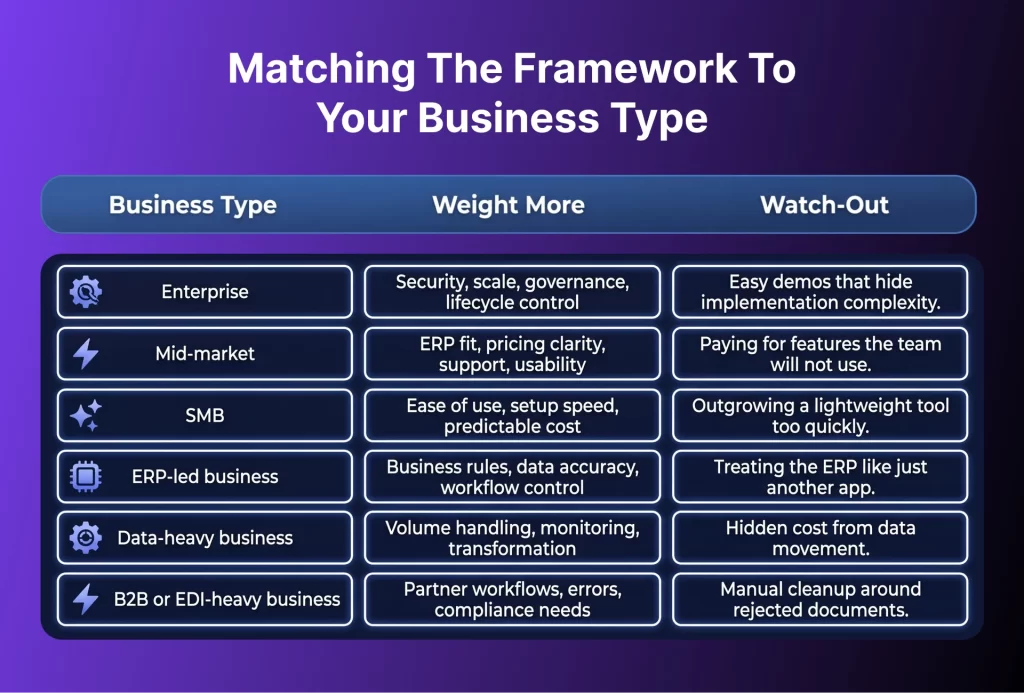
Enterprise buyers usually need control at scale, so they should focus on governance, user roles, testing, monitoring, and long-term maintainability. Mid-market buyers should watch for overbuying, since a platform can be capable yet too complex for the team managing it every day.
ERP-led buyers should be especially careful. The ERP is often the source of truth for orders, inventory, finance, pricing, taxes, fulfillment, and customer records. If the iPaaS does not respect those rules, automation simply moves bad data faster.
How APPSeCONNECT and appse ai Help
For ERP-led businesses, APPSeCONNECT focuses on connecting ERP, POS, accounting, eCommerce, CRM, marketplace, and shipping systems around real business workflows.
That matters when a company does not only want apps to talk to each other. It wants orders to move correctly, inventory to stay updated, customer data to remain clean, and finance teams to trust what reaches the ERP.
APPSeCONNECT works for mid-market teams that want integration without turning every change into a custom development project. Its value becomes clearer when buyers need visual workflow design, two-way data sync, alerts, audit trails, dashboards, and the flexibility to work across cloud, on-premise, or hybrid setups.
APPSeCONNECT also adds appse ai, its AI automation layer, which helps extend integration workflows into broader automation. That becomes useful when connected data needs to support decisions, routing, reviews, exceptions, or follow-up actions across teams.
Buyer Checklist Before You Commit
- Deployment: Can the platform work with the systems you use today?
- Pricing: What happens to cost when workflows, records, apps, or users increase?
- ERP Fit: Can the vendor handle ERP rules, field mapping, validation, and exceptions?
- Monitoring: Can your team see failed records and understand what went wrong?
- Support: Who helps with setup, testing, go-live, and production issues?
- Security: Are roles, access, audit history, and data controls clear?
- Change Management: Can workflows be updated safely after launch?
- Exit Path: What happens to mappings, logs, and workflows if you later move away?
A useful vendor conversation gets specific quickly. If the discussion stays at the feature level, ask for a walkthrough using your real systems, real data examples, and a realistic failure case.
Frequently Asked Questions
The main iPaaS vendor selection criteria are deployment fit, connector depth, workflow control, pricing clarity, reliability, security, support, and team fit. ERP-led buyers should also check how well the platform handles business rules, data accuracy, exceptions, and monitoring.
iPaaS pricing models differ based on what the vendor charges for. Some charge a fixed subscription, while others price by usage, connectors, workflows, data volume, or custom scope. Buyers should model pricing against future growth, not only the first integration.
A mid-market business should choose an iPaaS by scoring vendors against its current systems, team skills, workflow needs, support expectations, and future integration roadmap. ERP fit, usability, pricing clarity, and support often matter more than a long feature list.
iPaaS is usually better when a business wants reusable connectors, faster setup, monitoring, and easier maintenance. Custom integration can make sense when the workflow is highly unique, deeply technical, or tied to a proprietary system. Many businesses use both.
iPaaS providers help businesses connect apps, move data, automate workflows, monitor failures, and manage integrations across systems. Unified API vendors usually give developers one standard API for a group of similar apps. Unified APIs often fit product teams, while iPaaS platforms often fit internal business operations.
Conclusion
The best iPaaS vendor is not the one with the longest feature list. It is the one that fits your systems, workflows, team, and growth plans. A weighted scorecard keeps the decision practical and helps IT, finance, operations, and leadership compare vendors clearly before the contract is signed, while tradeoffs are still easier to manage.
To know how APPSeCONNECT can help you build, integrate, and automate applications and workflows across your stack, book a demo to know more.