A SAP Business One Shopify integration takes 2 hours to 3 business days with a pre-built, managed package, 4 to 12 weeks if you build it on a self-managed iPaaS, and 3 to 6 months for a fully custom build. The range you land in depends on one thing: whether you configure a proven connector or construct the integration logic from scratch.
If a quick number is all you came for, that is the answer. What it leaves open is which range applies to your SAP B1 version, your Shopify store type, and your data. What drives the timeline, what genuinely takes longer, and how a packaged approach compresses months of work into hours all come down to a handful of decisions you can check early.
Key Takeaways
|
What Is SAP Business One Shopify Integration?
A SAP Business One Shopify integration is a managed data connection between your SAP Business One ERP and your Shopify storefront, so orders, customers, items, inventory, pricing, invoices, and payments move between the two systems without manual re-entry. SAP Business One stays the system of record for finance, inventory, and fulfilment, while Shopify handles the storefront and the buyer.
Done well, the integration maps a Shopify order to the correct SAP B1 Business Partner, posts the right document chain, keeps available stock aligned across both systems, and pushes invoice and payment status back so finance and support work from the same numbers. Connecting SAP B1 to the rest of the stack is the wider goal of any SAP Business One integration project.
Why Businesses Connect SAP Business One and Shopify
Without integration, the two systems do not speak the same language. Every Shopify order becomes a manual SAP B1 entry, stock levels drift between the store and the warehouse, and finance chases numbers that never quite match. The scale of that manual burden is easy to underestimate: McKinsey found that at one company, 65 percent of orders required manual updates by staff, even though many were routine repeat transactions. As order volume grows, that gap turns into overselling, billing errors, and support tickets.
A connected setup removes the re-keying. Orders flow into SAP B1 with the right customer, tax, and pricing context. Inventory updates propagate outward so the storefront reflects real availability. Invoices and payments reconcile against the original ERP record. The result is less manual work, fewer mismatches, and an order-to-cash process that scales with the business rather than against it.
What Data Syncs and in Which Direction
The scope of a SAP Business One Shopify integration depends on your setup, but the core flows are consistent.
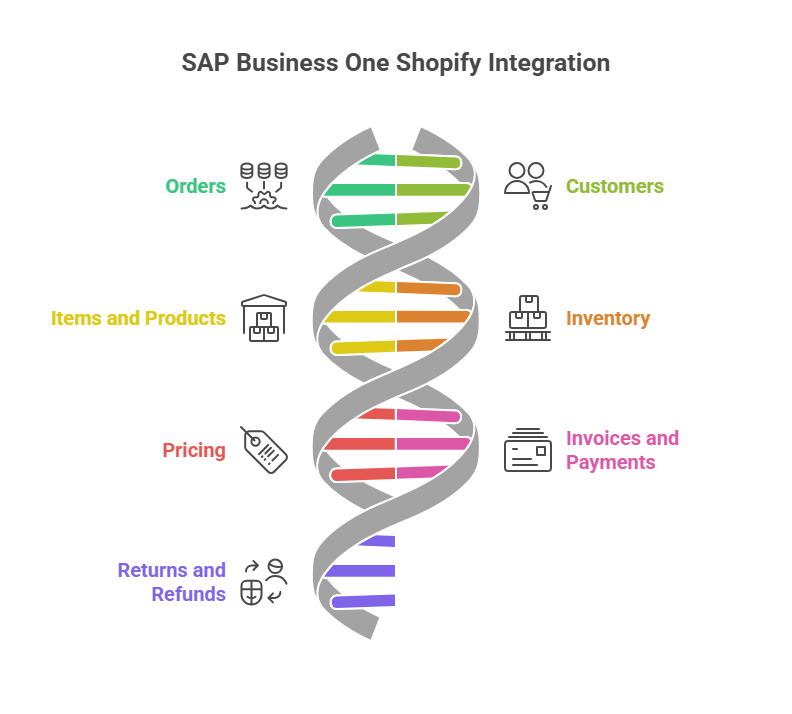
Record | Direction | Notes |
Orders | Shopify to SAP B1 | B2C and B2B orders post as SAP B1 sales documents against the matched Business Partner. |
Customers | Both directions | New Shopify shoppers create or match a Business Partner; SAP B1 accounts can seed Shopify. |
Items and products | SAP B1 to Shopify | Item master data syncs as simple or variant product types. |
Inventory | SAP B1 to Shopify | Real-time or scheduled stock updates keep storefront availability aligned. |
Pricing | SAP B1 to Shopify | Price lists sync to support customer-specific and B2B pricing. |
Invoices and payments | SAP B1 to Shopify | Invoice, payment, and reconciliation references push back for finance and support visibility. |
Returns and refunds | Both directions | Shopify return requests map to SAP B1 return orders and A/R credit memos. |
How Long It Takes by Integration Method
The single biggest driver of the timeline is the method you choose. Building from scratch and configuring a pre-built package are different kinds of work, measured in different units of time.
Method | Typical go-live | What drives the timeline |
Pre-built, managed package | 2 hours to 3 business days | Core logic is pre-built; work is configuration against your SAP B1 instance, not development. |
Self-managed enterprise iPaaS | 4 to 12 weeks | Your team or a partner builds Business Partner, invoice, and warehouse logic on the platform. |
Custom development | 3 to 6 months | Requirements gathering, development, and user acceptance testing for non-standard needs. |
These ranges reflect typical mid-market deployments by method, not a guarantee. The pre-built figure assumes a managed connector that already understands the SAP B1 object model; the self-managed figure assumes a general-purpose platform where the SAP B1 logic still has to be assembled. For context, Panorama Consulting’s 2024 ERP Report put the median ERP project timeline at 15.5 months, which is the scale of work a packaged connector is designed to sidestep.
How APPSeCONNECT Speeds Up SAP Business One Shopify Integration
With APPSeCONNECT’s predefined SAP Business One and Shopify package, go-live runs between 2 hours and 3 business days from scope confirmation to the first automated order. The package uses a pre-built connector architecture, so the Business Partner matching, A/R Reserve Invoice structure, multi-warehouse stock calculation, and B2B price list mapping are already built and tested. What remains is configuring it to your instance, which breaks into four steps:
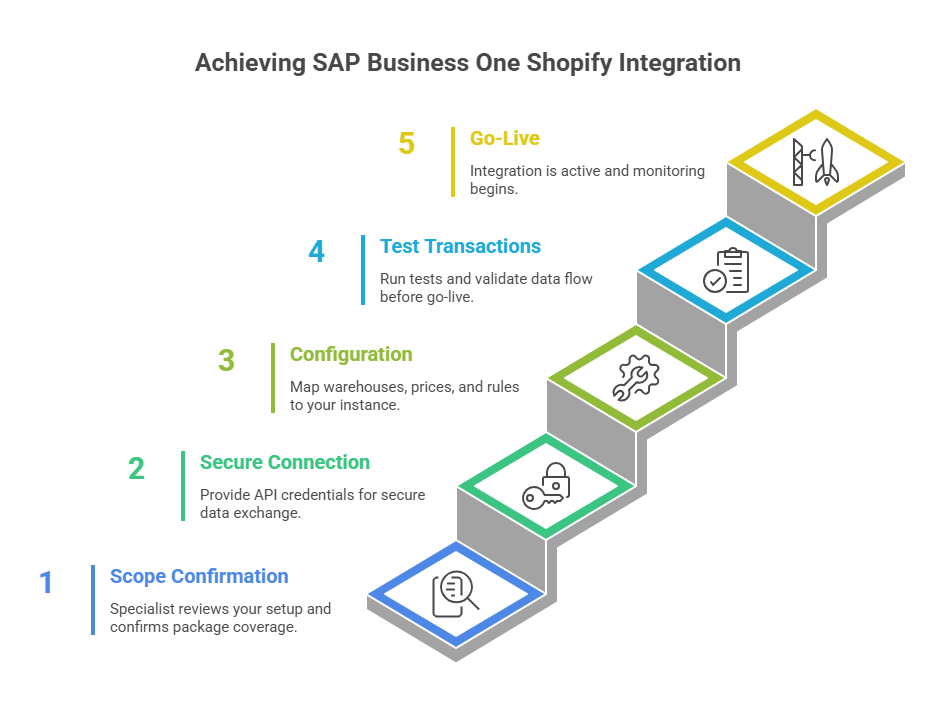
- Scope Confirmation: A specialist reviews your SAP B1 version, Shopify store type, warehouse structure, and application mix, and confirms the package covers your requirements. About 15 minutes of your time, with a response within one business day.
- Secure Connection: Your team provides SAP B1 Service Layer API credentials and Shopify API access. This is the only step that needs technical involvement, and it means supplying credentials, not writing code.
- Configuration: The team configures warehouse-to-location mapping, price lists, tax codes, payment methods, and Business Partner matching rules against your instance. You review and confirm.
- Test Transactions and Go-Live: Test transactions run across the core data flows, your team validates the documents in SAP B1, and the integration switches to production with monitoring active.
What Determines Your Timeline
Within the 2-hour to 3-day window, five configuration factors decide whether you go live the same day or closer to the third day.
- Warehouse structure: A single SAP B1 fulfilment warehouse mapping to one Shopify location is the simplest case and often goes live the same day. Mapping two to five warehouses to multiple Shopify locations adds one to two days.
- B2C versus B2B: A standard B2C store is the fastest. B2B Shopify Plus with company accounts, customer-specific price lists, net payment terms, and a company-contact hierarchy adds configuration for the B2B layer, typically one to two days.
- SAP B1 version: Version 10.0 and above with the Service Layer enabled is the fastest connection path. Version 9.x uses the DI API, which adds a step but stays within the window. Any Service Layer activation by your SAP partner should be arranged beforehand.
- Price lists and tax codes: A single price list with standard tax treatment is configured in hours. Five or more price lists, multiple tax jurisdictions, or multi-currency handling add one to two days.
- Data quality in SAP B1: This is the most variable factor. Clean, consistent Business Partner and item records keep configuration straightforward. Years of inconsistent records, duplicate items, or undocumented warehouse setups add a data review step, often one to three days beyond the standard window.
Implementation Phases at a Glance
Whatever method you choose, a reliable rollout moves through the same logical phases. A managed package compresses them; a self-managed or custom build expands each one.
- Discovery: Confirm SAP B1 version, Shopify store type, warehouse structure, and the records that create the most manual work.
- Data review: Check Business Partner and item master quality before anything syncs, since this is where timelines most often slip.
- Configuration: Map warehouses, price lists, tax codes, payment methods, and matching rules to your business logic.
- Testing: Run sample transactions across each data flow and validate the resulting SAP B1 documents.
- Staged go-live: Switch to production, activate monitoring, and confirm the first live orders post correctly.
Common Challenges and How to Handle Them
A few recurring issues account for most of the friction in a SAP Business One Shopify integration. Knowing them in advance keeps a project inside its expected range.
- Business Partner matching: Shopify allows guest checkout without full customer details, while SAP B1 requires every order to tie to a Business Partner. Mapping rules that match returning shoppers and create clean records for new ones prevent failed orders.
- Tax and pricing logic: Cross-border sales, multiple tax jurisdictions, and customer-specific price lists need to be mapped deliberately, not assumed.
- Inventory timing: Real-time triggers and scheduled syncs each have trade-offs; the right mix depends on order volume and how quickly the storefront needs to reflect stock changes.
- Document chain and returns: Returns, refunds, and credit memos have to follow the correct SAP B1 document sequence to keep finance records traceable.
- Peak load: High-volume periods test whether the integration can process and retry records without backlog, which makes monitoring and failure reprocessing important.
Integration Methods Compared
Choosing an approach is mostly a question of how much you want to build versus configure, and how unique your requirements really are.
A pre-built, managed package suits businesses whose requirements fall within standard SAP B1 and Shopify patterns, which covers most mid-market deployments. The logic is proven, the timeline is short, and there is no development work on your side.
A self-managed enterprise iPaaS suits teams with the technical resources and appetite to own the build. Even with connector templates, configuring SAP B1 Business Partner logic, the A/R Reserve Invoice structure, and multi-warehouse mapping is weeks of work, and more edge cases tend to surface in production.
A custom development project is the right choice only when requirements are genuinely unique: custom document types, non-standard Business Partner hierarchies, bespoke pricing logic, or fields outside the standard SAP B1 data model. It is also the most expensive wrong choice when the requirements are actually standard and a package would have covered them.
How a Pre-Built Package Compresses the Timeline
The reason a predefined package can go live in hours when custom development takes months is not a simplified feature set. It is years of SAP Business One integration work already codified into a connector architecture.
The logic that once took months to develop for early SAP B1 and Shopify deployments, the Business Partner matching, the A/R Reserve Invoice document pairing, the multi-warehouse available-stock calculation, and the B2B price list mapping, has been refined across a large base of production deployments and built into the package as standard.
APPSeCONNECT’s SAP Certified Partner status reflects that this logic has been reviewed against SAP’s own integration specifications, and the connector natively understands the SAP B1 object model rather than treating it as a generic database.
When a new integration is scoped, the team is not designing architecture from scratch. They are configuring a proven architecture against your instance, which is why the timeline is measured in hours and days rather than months.
How to Choose the Right Approach
Start with the requirements, not the tool. If your SAP B1 and Shopify setup follows standard patterns, a pre-built managed package will almost always be the fastest and lowest-risk path, and the question becomes which package covers your warehouse, pricing, and B2B needs. If you have in-house integration resources and want to own the build, a self-managed iPaaS is viable but plan for weeks, not days. Reserve custom development for requirements that are truly outside any standard model, and confirm they are genuinely unique before committing to a multi-month project.
Two checks settle most decisions early: confirm your SAP B1 version and Service Layer status, and review the quality of your existing Business Partner and item data. Both shape your timeline more than the platform you pick.
How to Get Started
The 2-hour to 3-day window applies to most mid-market SAP Business One and Shopify integrations, but confirming it for your configuration takes a short scope review. Identify the records that create the most manual work first, usually order, customer, item, inventory, and invoice or payment sync, then confirm your SAP B1 version, Shopify store type, warehouse structure, and geography. From there, a specialist can map, configure, test, and go live against your specific instance.
Talk to an APPSeCONNECT specialist to confirm your exact go-live timeline, scope, and pricing for your configuration.
Conclusion
How long a SAP Business One Shopify integration takes comes down to the method, not the systems. A pre-built managed package turns months of integration work into 2 hours to 3 business days, a self-managed iPaaS build runs 4 to 12 weeks, and a custom project takes 3 to 6 months. Within the packaged range, your warehouse structure, store type, SAP B1 version, pricing and tax complexity, and data quality decide whether you go live the same day or closer to the third.
For most mid-market businesses, the requirements are standard and a packaged approach is both the fastest and the lowest-risk choice. The practical next step is a short scope review of your SAP B1 version and data, which is enough to confirm your exact timeline.
Talk to an APPSeCONNECT specialist to map your configuration and confirm your go-live window.
Frequently Asked Questions
With a pre-built, managed package it takes 2 hours to 3 business days. A self-managed enterprise iPaaS build typically takes 4 to 12 weeks, and a fully custom development project usually takes 3 to 6 months. The difference is whether you configure proven connector logic or build it from scratch.
Five factors: the number of warehouses, whether the store is B2C or B2B Shopify Plus, your SAP B1 version, the number of price lists and tax codes, and the quality of your existing SAP B1 data. Data quality is the most variable, since inconsistent records add a review step.
Orders, customers, items and products, inventory, pricing, invoices and payments, and returns. Orders generally flow from Shopify into SAP B1, while inventory, pricing, and item data flow outward to Shopify. Customer and return records can move in both directions depending on the setup.
Native tools and web services can move data, but a third-party iPaaS adds pre-built connectors, a visual workflow designer, Business Partner and price-list handling, monitoring, and retry in one managed layer. The right choice depends on how many systems you connect and how much custom code you want to maintain.
Version 10.0 and above with the Service Layer enabled gives the fastest connection. Version 9.x connects through the DI API, which adds a configuration step but stays within the standard window. If your instance needs Service Layer activation, arrange it with your SAP partner before scoping.
A managed integration captures logs, snapshots, node status, and API responses so you can see what happened. Auto-retry handles transient failures, and once a mapping or data issue is corrected, the affected records can be resynced.
B2B Shopify Plus with company accounts, customer-specific price lists, net payment terms, and a company-contact hierarchy is supported, though the B2B layer adds configuration that typically extends go-live by one to two days compared with a standard B2C store.