Most growing companies run two systems side by side. The CRM holds everything about customers, leads, and deals. The ERP runs the back office, including inventory, orders, finance, and fulfillment. Both are useful on their own, but when they cannot talk to each other, teams end up entering the same information twice and working from numbers that do not match.
CRM ERP integration connects these two systems so information moves between them automatically. When sales closes a deal in the CRM, the ERP can pick it up, update stock, and create the order without anyone retyping it. The aim is simple. One set of accurate data that sales, finance, and operations can all trust.
This guide explains what CRM and ERP integration is, how it works, the methods and data involved, the benefits and challenges, and how to choose an approach that keeps working as your business grows.
What is CRM ERP Integration?
CRM ERP integration is the process of connecting your customer relationship management system with your enterprise resource planning system so they share data. Instead of two separate records of the same customer, order, or product, both systems stay in sync.
In practice, a change in one system shows up in the other. A new customer added in the CRM appears in the ERP. A price update in the ERP reaches the sales team in the CRM. The result is a single source of truth and a complete view of each customer across the front office and the back office.
It also clears the data silos that build up when sales and operations keep separate records. With one connected flow of information, everyone works from the same picture.
Why Connect Your CRM and ERP?
To see why integration matters, it helps to look at what each system does and what happens when they stay apart.
What a CRM Does
A CRM manages relationships with customers and prospects. It stores contact details, tracks conversations, and follows deals through the sales pipeline. Sales and marketing teams rely on it to respond quickly, close deals, and keep customers happy. Salesforce, HubSpot, Zoho CRM, Pipedrive, and Microsoft Dynamics 365 are common examples.
What an ERP Does
An ERP manages the internal side of the business. It handles inventory, purchasing, order processing, invoicing, finance, and often HR. It gives operations and finance teams one place to plan resources and keep records straight. SAP Business One, SAP S/4HANA, NetSuite, Microsoft Dynamics 365 Business Central, and Sage are widely used.
The Cost of Keeping Them Apart
When the CRM and ERP run in isolation, the same data lives in two places. Someone enters a customer in the CRM, then someone else types the same details into the ERP. Prices and stock levels fall out of date. Sales promises something the warehouse cannot deliver. These gaps slow people down and lead to mistakes that customers notice. Connecting the systems closes those gaps.
How Does CRM ERP Integration Work?
CRM and ERP integration works through the APIs that both systems provide. An API is a set of rules that lets one application request and update data in another. Through these APIs, customer records, pricing, stock levels, orders, and invoices move between the two platforms.
It helps to separate two things that often get grouped together. The first is data synchronization, which keeps shared records consistent in both systems. The second is workflow automation, where an event in one system triggers an action in the other. For example, a won deal in the CRM can automatically create a sales order in the ERP. Strong integration does both.
You can build this connection yourself using the APIs directly, which calls for development skills, or you can use a ready made platform that connects CRMs and ERPs for you. For most teams the second option is faster and easier to maintain, because the platform handles the heavy lifting and keeps the connection running.
CRM ERP Integration Architecture
At a high level, the architecture of a CRM ERP integration describes how data flows between the two systems and which system controls each field. A few decisions shape it.
- Direction of each sync: some data flows one way and some flows both ways. Pricing usually moves from the ERP to the CRM, while quotes move from the CRM to the ERP.
- Field mapping: each field in one system has to match the right field in the other, so a customer record lines up correctly on both sides.
- Trigger and timing: data can sync the moment something changes or on a set schedule.
- The connecting layer: APIs do the talking, and an integration platform or custom code coordinates the flow.
Getting these decisions right early keeps the integration stable as you add more data and more users.
CRM ERP Integration Methods
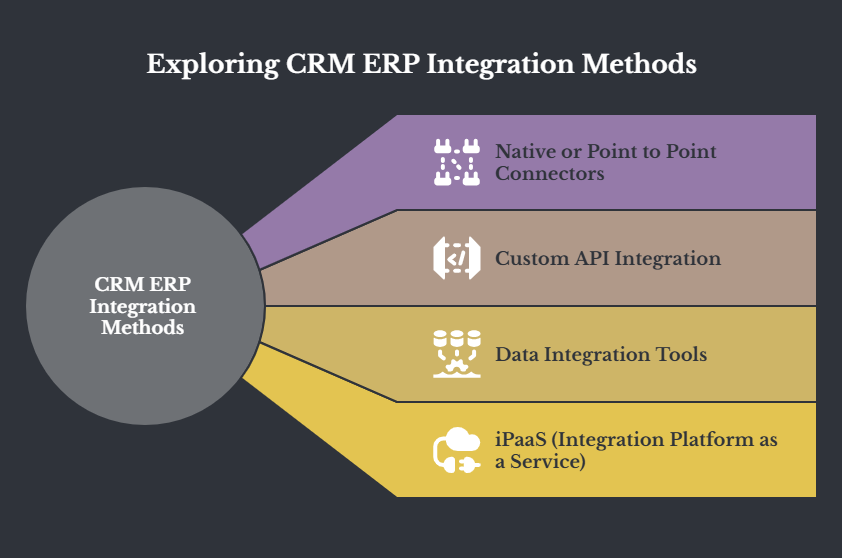
There are a few ways to connect a CRM and an ERP. The right one depends on how complex your systems are, your budget, and how much you want to customize.
Native or Point to Point Connectors
A native connector links one CRM directly to one ERP, often supplied by one of the vendors. It is quick to set up when a ready made connector already exists for your exact pair of systems. The limit is that each connection is one to one, so as you add more applications the number of separate links grows and gets harder to manage.
Custom API Integration
Here you build the connection from scratch using the APIs of both systems. This gives you the most control and can handle very specific needs, but it takes development time and ongoing maintenance, since you own and update the code.
Data Integration Tools
These tools focus on keeping data consistent across systems rather than automating full workflows. They suit businesses that mainly need accurate, matching records between sales, finance, and operations.
iPaaS (Integration Platform as a Service)
An iPaaS sits between your applications and connects them through prebuilt templates, visual workflows, and low code tools. It can handle complex setups without heavy coding and keeps the connection maintained for you. For many businesses an iPaaS offers a strong balance of flexibility, ease of use, and cost, which is why it has become a common choice for CRM and ERP integration. APPSeCONNECT is an iPaaS built for connecting CRMs and ERPs.
A quick comparison of the methods
Method | Best suited for | Customization | Maintenance | Scales across apps |
Native or point to point | A single CRM to ERP link with a ready connector | Low | Grows with each link | Limited |
Custom API integration | Very specific needs with development resources | High | High | Moderate |
Data integration tools | Keeping records consistent without full workflows | Medium | Medium | Moderate |
iPaaS | Connecting several apps quickly with low code | High | Low and managed | Strong |
Which Data Syncs Between CRM and ERP?
A CRM ERP integration usually synchronizes a set of shared records. These are the common ones, along with the direction they typically move.
- Accounts and business partners: customer and partner details such as names, addresses, phone, and industry. Both ways.
- Contacts: the people linked to each account, kept matched across both systems. Both ways.
- Pricing and price books: prices maintained in the ERP and pushed to the CRM so quotes stay accurate. ERP to CRM.
- Items and products: product names, codes, descriptions, and related prices. ERP to CRM.
- Quotes: quotes created in the CRM and sent to the ERP for processing. CRM to ERP.
- Sales orders: order details with line items, shared so sales can see status. ERP to CRM.
- Invoices: invoice headers and line items, giving sales visibility of billing. ERP to CRM.
- Payment and accounts receivable status: what a customer owes, so reps know before they call. ERP to CRM.
- Inventory and stock levels: current availability, so sales never promise what is not there. ERP to CRM.
- Order and shipment status: where an order is in the process and when it will arrive. ERP to CRM.
Which System Owns Which Data?
One of the most common reasons an integration goes wrong is not technical. It is unclear ownership of data. If both systems can edit the same field, they will eventually overwrite each other. Good data governance means deciding, for each record, which system is the system of record and which simply receives a copy. Master data management keeps one trusted record for each customer and product.
A simple ownership map agreed before you build prevents most of these problems.
Data | System of record | Sync direction |
Accounts and business partners | Shared, set field by field | Both ways |
Contacts | CRM | Both ways |
Items and products | ERP | ERP to CRM |
Pricing | ERP | ERP to CRM |
Quotes | CRM | CRM to ERP |
Sales orders | ERP | ERP to CRM |
Invoices | ERP | ERP to CRM |
Deal or opportunity stage | CRM | CRM to ERP |
Benefits of CRM ERP Integration
When the two systems share data, the gains show up across sales, service, operations, and finance. Here are the main benefits.
Faster, More Accurate Sales
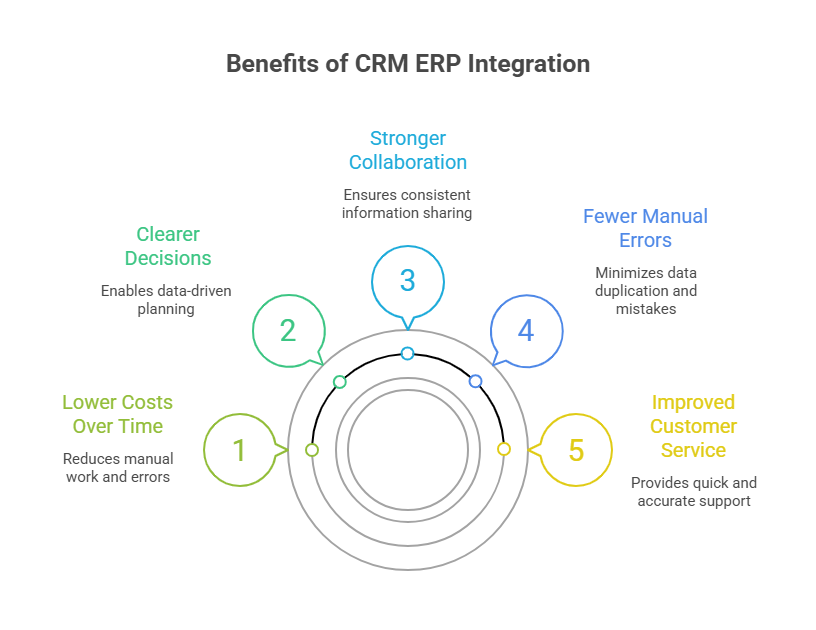
Sales reps see live pricing, stock, and customer history inside the CRM, so they can quote quickly and with confidence. They no longer log into the ERP or wait for someone to check.
Better Visibility for Operations and Finance
Back office teams can see sales activity, quotes, and orders without chasing the sales team. That makes it easier to plan inventory, resources, and cash flow.
Improved Customer Service
Support staff can check an order, an address, or a payment in one place. Customers get clear answers without being passed between departments.
Fewer Manual Errors
Automated syncing removes most retyping, which cuts the duplicate and mismatched records that come from manual entry. Cleaner data means fewer returns and corrections.
Stronger Collaboration
Sales, service, and operations work from the same order and inventory details. When a price changes or a shipment is delayed, everyone sees it at the same time.
Clearer Decisions
With sales and finance data together, managers can spot trends, see what is selling, and plan based on current information rather than guesswork.
Lower Costs Over Time
Less manual work and fewer errors free up hours and reduce the cost of fixing mistakes, so teams spend more time on customers and less on busywork.
Common Use Cases for CRM ERP Integration
Quote Faster
With live pricing and stock in the CRM, reps build accurate quotes on the spot instead of checking the ERP first.
Speed Up Invoicing and Payments
Once a quote is accepted, the ERP can create the sales order and invoice and send the details back to the CRM, so billing and collection move faster.
Sell and Update on the Go
Because CRMs are often available on mobile, reps can update records and check data from anywhere, and those updates flow back to the ERP.
Plan and Forecast with Current Data
When sales orders and inventory stay in sync, operations and finance can forecast and plan with numbers that reflect what is actually happening.
Connect Online Sales
For businesses selling online, linking the CRM and ERP keeps orders, stock, and customer data aligned across channels, which supports CRM and ERP integration for ecommerce.
Common Challenges in CRM ERP Integration
Integration is worth doing, but it comes with a few challenges worth planning for.
Different Data Structures
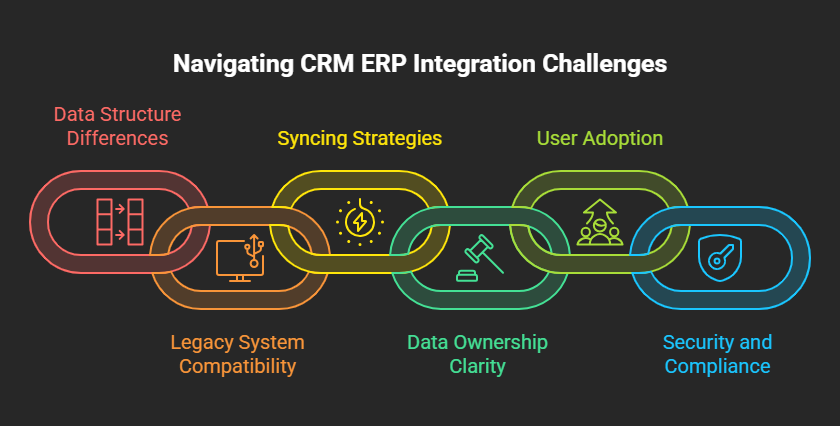
The two systems often store data in different ways, so fields do not always line up. Without careful mapping, you get duplicate or mismatched records.
Older or Legacy Systems
Older ERPs may not have modern connection options, which makes integration harder and more prone to errors. Upgrading these systems removes a lot of friction.
Real Time Versus Scheduled Syncing
Syncing every change instantly uses more resources, while syncing on a schedule can leave data slightly out of date. Most setups mix both depending on how time sensitive the data is.
Unclear Data Ownership
When it is not clear which system owns a field, the two can overwrite each other. Settle ownership before you connect anything.
User Adoption
The technical side is only half the job. Teams have to trust and use the new flow, so training and clear communication matter.
Security and Compliance
Customer and financial data moving between systems needs proper access controls and records of who changed what, especially in regulated industries.
Best Practices for a Successful Integration
Pick a Platform Built for CRM and ERP
Choose a low code or no code iPaaS with prebuilt connectors for systems like Salesforce, HubSpot, SAP, and Microsoft Dynamics. It is easier to manage than point to point links or custom code.
Plan What to Sync Early
List the records you need to keep in sync, such as customers, orders, and inventory. Clear mapping up front reduces errors and avoids syncing data you do not need.
Clean Your Data First
Integrating two systems full of duplicate or outdated records just spreads the mess. Clean and remove duplicates before you go live.
Update Legacy Systems Where You Can
Older systems with limited connection options hold integration back. Moving to current versions makes the whole process smoother.
Balance Real Time and Scheduled Syncs
Use real time syncing for time sensitive data like pricing and stock, and scheduled syncing for less urgent records like historical reports.
How to Measure Integration Success
Once the integration is live, it helps to track whether it is working. A few practical measures show the impact without guesswork.
- Order to cash cycle time: how long it takes from quote to paid invoice.
- Sync error rate: the share of records that move without failing.
- Duplicate record rate: how many duplicate customers or contacts the integration prevents.
- Quote accuracy: fewer pricing and stock mistakes on quotes drawn from live data.
- Sync delay: the time between a change in one system and its appearance in the other.
Note where these stand before you start, so you can see the difference afterward.
How to Choose a CRM ERP Integration Platform
When you compare platforms for CRM and ERP integration, look for a few things.
- Strong, well documented APIs on both systems.
- Control over which system owns each field and the direction of each sync.
- Support for both real time and scheduled syncing.
- Prebuilt connectors for your exact systems, such as Salesforce, HubSpot, SAP Business One, NetSuite, Sage, and Microsoft Dynamics 365.
- A solid partner network and implementation support.
- Clear pricing.
A platform that already supports your specific CRM and ERP pair will be faster to set up than a general purpose tool.
How AI Is Changing CRM ERP Integration
Once your CRM and ERP share one clean set of data, AI has something reliable to work with. On top of connected systems, teams are starting to use AI to forecast demand, summarize account history, draft quotes, and handle routine order and invoice steps. The integration is the foundation. Without unified data, AI works from the same gaps and errors that sit inside the separate systems.
Popular CRM and ERP Systems You Can Connect
With your CRM as the hub for customer relationships and your ERP as the core of operations, connecting them is the natural next step. Below are common systems you can link.
|
CRM systems |
ERP systems |
|
Salesforce |
SAP Business One |
|
HubSpot |
SAP S/4HANA |
|
Zoho CRM |
SAP ECC |
|
Pipedrive |
NetSuite |
|
Microsoft Dynamics 365 CRM |
Microsoft Dynamics 365 Business Central |
|
SugarCRM |
Dynamics NAV |
|
|
Sage 300 |
|
|
Priority |
Get Started with CRM and ERP Integration
Connecting your CRM and ERP turns two separate systems into one reliable flow of information. Whether you need a ready made connector or a more tailored setup, an iPaaS like APPSeCONNECT can link your systems and keep them in sync. Book a demo to see how it works, or start a free trial to test the workflows with your own systems. You can also reach out with any questions.
Frequently Asked Questions
A CRM manages customer facing activity like leads, contacts, and sales. An ERP manages internal operations like inventory, orders, and finance. Integration connects the two so they share one set of data.
Some ERPs offer basic CRM features, but they rarely match a dedicated CRM for sales and marketing. Many businesses run both and connect them rather than relying on ERP modules alone.
It varies. A ready made connector can be live in a short time, while a heavily customized build can take longer, depending on the number of records, data quality, and ownership decisions.
Yes. Cloud ERPs are generally well suited to integration because they offer modern APIs, which makes connecting them with a CRM straightforward through an integration platform.
It depends on the record. The ERP usually owns items, pricing, orders, and invoices, while the CRM owns contacts and deal stages. Decide this field by field before you build.