Choosing between Salesforce and HubSpot rarely comes down to which platform has more features, because both have plenty. It comes down to fit: how complex your sales process is, how much customization and administration your team can support, and how your budget scales as you add seats and AI. Pick wrong and you either pay for power you never switch on, or you outgrow a tool that felt perfect at ten people.
HubSpot tends to suit small and mid-market teams that want speed, a gentle learning curve, and strong marketing automation in one connected platform. Salesforce tends to suit mid-market and enterprise teams that need deep customization, complex sales workflows, and a platform they can extend almost without limit. Neither is “the best CRM” in the abstract. The better choice is the one that maps to how your revenue team actually works.
Both have also changed meaningfully going into 2026. Salesforce has folded its AI agents into the product under the Agentforce brand and raised prices on its higher tiers, and HubSpot has moved to seat-based pricing and rolled its AI features together under Breeze. Those shifts change the math on cost and capability, and they land as adoption keeps climbing.
Key Takeaways
|
Salesforce: Strengths, Trade-Offs, and Ideal Fit
Salesforce is the long-standing leader in the CRM market and is built around depth and configurability, in a worldwide CRM software market that grew 13.4% to $128 billion in 2024. Its CRM, sold under the Sales Cloud line (now branded within the Agentforce Sales family), centers on lead and opportunity management, pipeline visibility, forecasting, and reporting that can be tailored to almost any sales motion. It is a cloud platform companies tend to grow into rather than out of.
Its core strength is customization and scale. Territory management, advanced automation, granular permissions, and the AppExchange ecosystem let large organizations model complex, multi-team sales processes. For B2B operations with sophisticated lead routing, approval flows, and deep analytics needs, that ceiling is the main reason to choose it.
The trade-off is complexity and cost. Salesforce has a steeper learning curve, and many organizations rely on administrators or certified implementation partners to configure and maintain it. Pricing climbs quickly at the upper tiers, and advanced AI and analytics often sit in higher editions or paid add-ons. The well-designed Trailhead learning platform softens the ramp, but the platform still rewards teams that can invest in running it well.
Best for: Mid-market and enterprise teams with complex B2B sales processes, dedicated admin resources, and a need for deep customization and scale.
HubSpot: Strengths, Trade-Offs, and Ideal Fit
HubSpot grew up as an inbound marketing platform and expanded into a full customer platform built on a shared CRM, with Marketing Hub, Sales Hub, and Service Hub sitting on top. Its design philosophy is to let users learn the product while using it, which is why it is consistently praised for ease of use and fast onboarding.
Its core strength is approachability paired with strong marketing automation. Email campaigns, drag-and-drop workflows, lead scoring, and a connected view across marketing, sales, and service make it powerful for teams that want one platform without heavy setup. The free CRM is genuinely functional, and HubSpot Academy gives new users a clear path to competence.
The trade-off shows up as you scale. Costs can rise in ways that surprise teams, because Marketing Hub bills by marketing contacts on top of seats, Professional and Enterprise tiers carry one-time onboarding fees, and the most useful sales features such as sequences and advanced reporting sit behind the Professional tier. For very large or highly bespoke sales operations, HubSpot can also feel less configurable than Salesforce at the extreme end.
Best for: Small and mid-market teams that want quick time to value, marketing-led growth, and an all-in-one platform that is easy to adopt.
Quick Comparison: Salesforce vs HubSpot at a Glance
Dimension | Salesforce | HubSpot |
Best for | Mid-market to enterprise, complex B2B sales | SMB to mid-market, marketing-led growth |
Ease of use | Steeper learning curve; often needs admins | Highly intuitive; fast onboarding |
Pricing model | Per user, per month; sharp tier jumps | Per seat, per month; plus contacts and onboarding |
Free plan | Free plan for up to 2 users | Free CRM for core users with usage limits |
Customization | Very deep; broad configurability | Strong, but less bespoke at the extreme end |
Marketing automation | Robust via Marketing Cloud products | Core strength, built in and easy to use |
AI suite | Agentforce and Einstein | Breeze (Assistant, Agents, Intelligence) |
App ecosystem | AppExchange (large, mature) | HubSpot App Marketplace |
Scalability | Enterprise-grade ceiling | Scales well into mid-market and beyond |
Pricing can vary by plan, seat type, and usage, so compare the latest figures for your team size before budgeting.
Key Decision Factors
The features that look similar on a comparison grid behave differently in daily use. These are the factors that usually decide the choice, with the buyer questions worth asking under each.
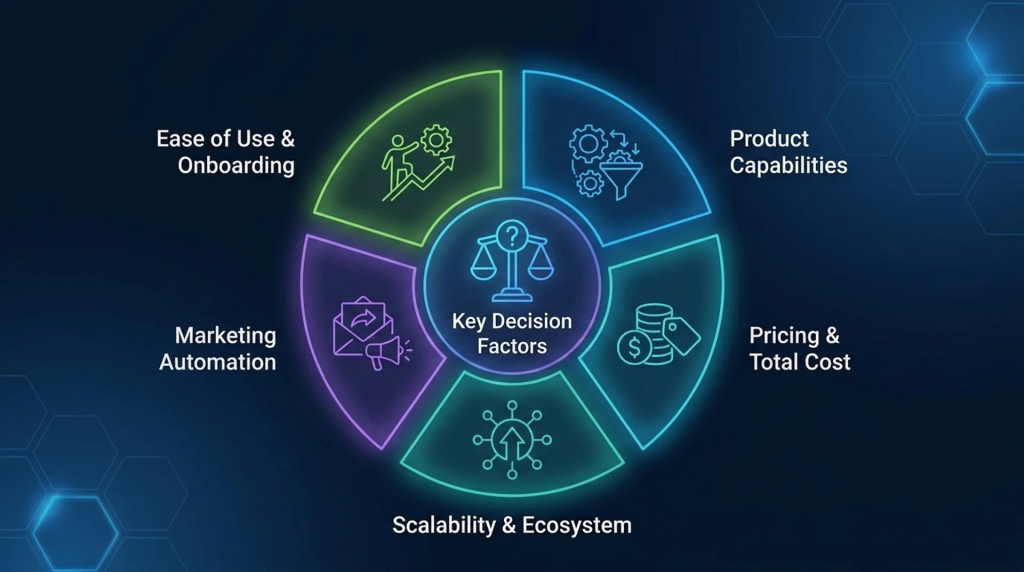
Ease of Use and Onboarding
HubSpot is built so users can become productive quickly, with an intuitive interface and a strong learning path through HubSpot Academy. Salesforce is more sophisticated and rewards experienced users, with Trailhead providing structured, gamified training to shorten the ramp.
Ask: How much CRM experience does the team already have? Can you dedicate an admin or partner to setup, or do you need to be live in weeks?
Product Capabilities and Sales Management
Salesforce Sales Cloud combines lead and opportunity management with deep routing, forecasting, and customizable reporting, which suits intricate B2B pipelines. HubSpot Sales Hub covers pipeline management, email templates, call tracking, sales playbooks, quotes, and analytics in a cleaner package that most teams can run without specialists.
Ask: How complex is your sales process, and how much of it needs custom logic rather than configuration out of the box?
Marketing Automation
HubSpot’s marketing-first heritage shows in its email automation, drip campaigns, customizable workflows, and lead nurturing, all managed through an accessible interface. Salesforce delivers marketing automation through its Marketing Cloud products, which are powerful and well suited to large, multi-channel programs but add cost and setup.
Ask: Is marketing automation central to your growth, or a supporting function? Do you want it native to the CRM or as a connected layer?
Pricing and Total Cost
The two platforms diverge most on cost structure, covered in detail below. The headline difference: Salesforce scales by user and edition with steep jumps at the top, while HubSpot scales by seat and, for marketing, by contact volume, with onboarding fees on higher tiers.
Ask: What will this cost not at launch, but at your projected team size and contact volume in two years?
Scalability and Ecosystem
Salesforce is designed for organizations that keep growing in complexity, with the AppExchange offering a large catalog of integrations and extensions. HubSpot scales comfortably into mid-market and increasingly beyond, with its App Marketplace and built-in tools covering most common needs.
Ask: Where will the business be in three years, and does the platform’s ceiling sit above that?
Salesforce vs HubSpot Pricing Compared
Both vendors publish per-user or per-seat pricing, but the real bill depends on edition, seat type, add-ons, onboarding, and, for HubSpot marketing, contact volume. The figures below reflect current public list pricing in the United States, billed annually unless noted.
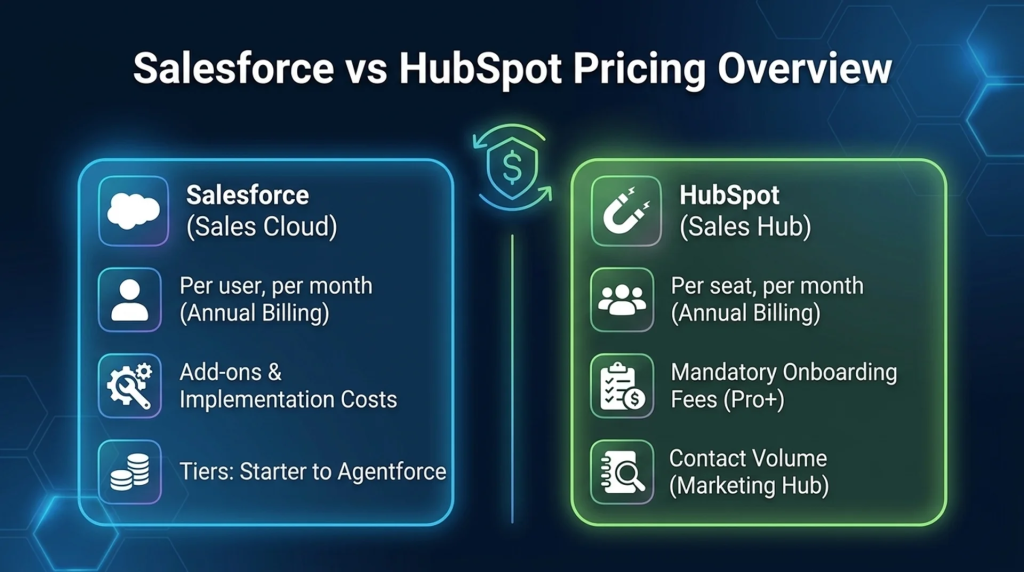
Salesforce Sales Cloud (per user, per month, billed annually):
- Starter Suite: about $25
- Pro Suite: about $100
- Enterprise: about $175
- Unlimited: about $350
- Agentforce 1 Sales: about $550
Salesforce also offers a free plan for up to two users, and most editions require annual billing, with Starter Suite the common exception that allows monthly billing. Enterprise is typically the first tier with full API access, which matters if integration is part of the plan. Beyond licenses, budget for implementation, admin resources, and add-ons, which can rival the license cost.
HubSpot Sales Hub (per seat, per month, billed annually):
- Free CRM: $0 for core users, with usage limits
- Starter: about $20 per seat (often lower on annual prepayment or promotion)
- Professional: about $100 per seat, plus a one-time onboarding fee
- Enterprise: about $150 per seat, plus a one-time onboarding fee
HubSpot’s free CRM is genuinely usable for small teams, and Sales Hub no longer carries seat minimums. The cost surprises usually come from three places: Marketing Hub billing by marketing contacts on top of seats, mandatory onboarding fees on Professional and Enterprise, and key sales features such as sequences gated at Professional. Bundling multiple hubs into the Customer Platform is often cheaper than buying hubs separately.
AI Features: Agentforce and Einstein vs Breeze
AI has become one of the clearest dividing lines between the two platforms, and both reorganized their AI offerings recently.
Salesforce brings AI together under Agentforce, its platform for building and deploying autonomous agents, alongside Einstein for predictive and generative features such as lead and opportunity scoring. The most complete AI capabilities sit in higher editions or are available as paid add-ons, and Salesforce has changed how Agentforce is packaged and billed more than once, so check the current packaging for your edition. The emphasis is on deeply customizable, autonomous agents for organizations with the data maturity and governance to use them.
HubSpot packages its AI under Breeze, organized into three parts: Breeze Assistant, the conversational helper available across plans for writing, summarizing records, and answering CRM questions; Breeze Agents, autonomous agents for tasks such as prospecting, customer support, and content; and Breeze Intelligence, for data enrichment and buyer-intent signals. Breeze runs on a HubSpot Credits model, with the Assistant and some features available broadly and full agent access tied to higher tiers. The emphasis is on accessible AI built into the CRM with minimal setup.
The practical read: if you want highly configurable, autonomous AI and have the resources to govern it, Salesforce’s direction fits. If you want useful AI that your team can adopt quickly without a heavy build, HubSpot’s approach fits.
Integrations and App Ecosystem
Neither CRM operates in isolation, and both rely on integrations to connect to the rest of a company’s stack. Salesforce offers the AppExchange, a large and mature marketplace of integrations and industry solutions, reflecting its broad enterprise footprint. HubSpot offers the HubSpot App Marketplace, with a wide range of connectors plus native integration tooling inside the platform.
For businesses that run more than a CRM, the bigger integration question is how the CRM connects to the systems that actually fulfill, bill, and support customers, such as an ERP, an eCommerce platform, or a finance system. Both platforms can connect to each other and to those systems, but synchronizing customer, order, inventory, and invoice data reliably across a wider stack is where a dedicated integration platform fits.
APPSeCONNECT is for teams that want to connect a CRM to ERP, eCommerce, and other line-of-business applications through managed workflows.
Which CRM Should You Choose?
The right answer depends on your size, sales complexity, and where you want to invest your team’s time.
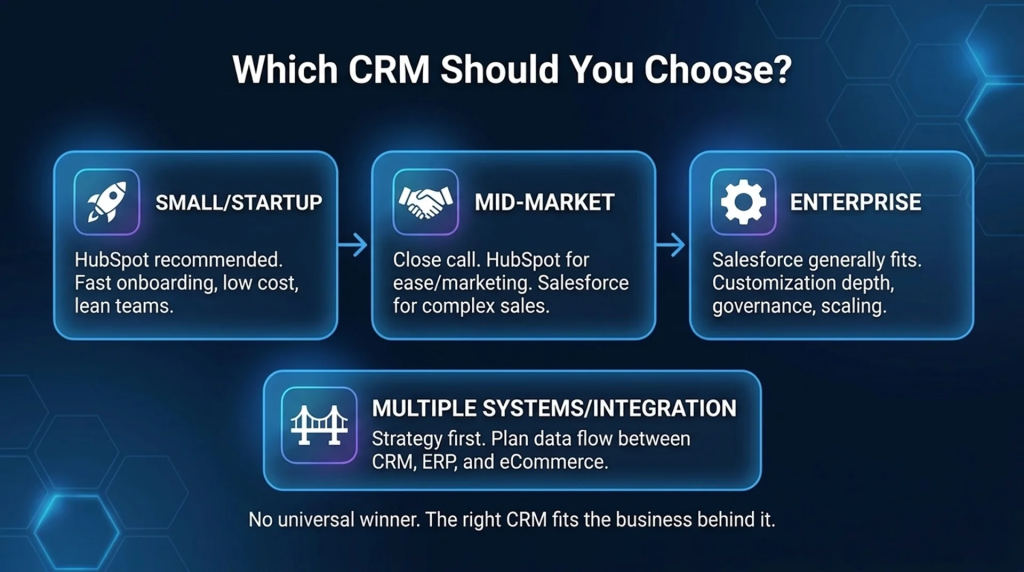
- Small businesses and startups: HubSpot is usually the stronger starting point. The free CRM, low entry cost, and fast onboarding let a lean team get value quickly without dedicated admins.
- Mid-market teams: This is the closest call. Choose HubSpot if marketing-led growth and ease of use matter most; choose Salesforce if your sales process is complex enough to need deep customization and you can support the platform.
- Enterprise organizations: Salesforce generally fits better, with the customization depth, governance, and ecosystem to model complex, multi-team operations and keep scaling.
- Businesses running both, or connecting CRM to ERP and eCommerce: The CRM choice matters less than the integration strategy. Plan early for how customer, order, and finance data will move between systems, since that determines how much manual work the team carries later.
There is no universal winner. A focused SMB and a global enterprise can both make the right call and choose different platforms, because the right CRM is the one that fits the business behind it.
Frequently Asked Questions
Neither is better in every case. HubSpot is generally better for small and mid-market teams that value ease of use and built-in marketing automation. Salesforce is generally better for mid-market and enterprise teams that need deep customization, complex workflows, and a platform built to scale.
The core difference is approach. HubSpot is an easy-to-adopt, marketing-led customer platform with a strong free CRM. Salesforce is a highly customizable, sales-and-enterprise-focused platform with greater depth and a steeper learning curve.
HubSpot often costs less to start, with a free CRM and lower entry tiers, but total cost depends on seats, marketing contacts, onboarding fees, and tier. Salesforce starts around the same entry price but rises sharply at higher editions. Model your real seat count and usage before deciding.
HubSpot is usually the better fit for small businesses, thanks to its free CRM, gentle learning curve, and fast time to value. Salesforce can work for small teams with specific needs but tends to require more setup and ongoing administration.
Yes. HubSpot and Salesforce can be connected so data flows between them, which some organizations do when different teams use different systems. Many teams use a native connector or an integration platform to keep records in sync rather than maintaining custom code.
For many small and mid-market teams, yes, HubSpot can fully replace Salesforce. For large enterprises with highly complex, customized sales processes, Salesforce’s depth may be difficult to replicate, so the answer depends on how much customization the business actually relies on.
It depends on motion and stage. Early and growth-stage SaaS teams with marketing-led acquisition often prefer HubSpot for speed and built-in automation. SaaS teams with complex sales operations, heavy customization, or enterprise deals often choose Salesforce.
Making the Decision
Salesforce versus HubSpot is not a debate one platform wins outright, because the deciding factor is your business, not the feature list. Start from three questions: how complex is your sales process, how much administration can your team support, and how will cost scale as you add seats, contacts, and AI. HubSpot rewards teams that want speed, simplicity, and marketing-led growth. Salesforce rewards teams that need depth, control, and an enterprise ceiling.
Whichever you choose, the CRM only delivers full value when it is connected to the rest of your stack, since both run as standalone systems until orders, inventory, and invoices flow cleanly between the CRM and the systems that fulfill and bill customers. If you are weighing how a CRM will connect to your ERP, eCommerce, or finance platforms, mapping that integration path early will save your team significant manual work later.
To know how APPSeCONNECT automates and integrates Salesforce and HubSpot integrations with tools your business uses, book a demo to know more.